
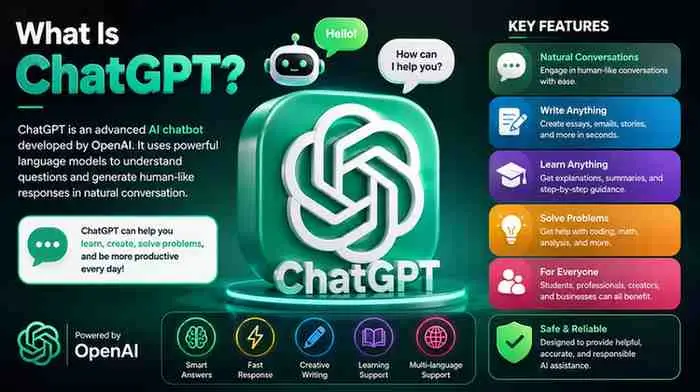
ChatGPT is an AI chatbot built by OpenAI that can hold conversations, answer questions, write and edit text, generate images, analyze files, and even carry out multi-step tasks on your behalf. Since launching in late 2022, it has grown from a novelty text generator into a daily tool used by roughly a billion people every week for research, writing, coding, and planning. This guide explains what ChatGPT actually is, how it works, what it costs in 2026, and where it still falls short , so you can decide if, and how, it fits into your routine.
What Is ChatGPT?
ChatGPT is a generative AI chatbot powered by a family of large language models (LLMs) called GPT, short for Generative Pre-trained Transformer. You type a question or instruction , called a prompt , and ChatGPT generates a text response based on patterns it learned from massive amounts of training data.
Unlike a traditional search engine, ChatGPT doesn’t just return links. It synthesizes an answer, holds context across a conversation, and can adjust its response based on follow-up questions. It’s available as a website, a desktop app, and mobile apps for iOS and Android, and it also powers features inside many third-party products through OpenAI’s API.
As of mid-2026, ChatGPT runs on the GPT-5.6 model family, which OpenAI splits into different versions for different jobs: a fast, lightweight version for quick chat, and a more capable version for complex reasoning, coding, and research. Free and low-cost plans get the lighter models, while paid plans unlock the more advanced ones.
How Does ChatGPT Work?
ChatGPT works by predicting the most likely next piece of text based on your prompt and the conversation so far. It doesn’t “know” facts the way a database does , it generates language based on statistical patterns learned during training on large volumes of text and code.
In simple terms, here’s the process:
- You submit a prompt , a question, instruction, or file.
- The model interprets intent using the surrounding conversation for context.
- It generates a response token by token, choosing the most statistically appropriate words.
- For complex requests, newer “reasoning” or “thinking” modes let the model work through a problem in steps before answering, which improves accuracy on math, logic, and coding tasks.
- For agent-style tasks, ChatGPT can browse the web, run code, or interact with files and connected apps, then return a finished result instead of just a text answer.
This is why ChatGPT can write a poem, debug code, and summarize a PDF in the same conversation; it’s applying the same underlying prediction process to very different kinds of tasks.
Key Features of ChatGPT
- Conversational chat with memory of earlier messages in a session (and, on paid plans, memory across sessions)
- Deep Research, which runs multi-step web research and returns a sourced report
- Agent mode, which lets ChatGPT operate a virtual browser to complete tasks like filling forms, comparing prices, or editing spreadsheets
- Canvas, a side-by-side editor for drafting and revising long documents or code
- Image generation, built on OpenAI’s image models, for creating or editing visuals from a text prompt
- Voice mode, for spoken, real-time conversations
- Custom GPTs, which let users build task-specific versions of ChatGPT with custom instructions
- File and data analysis, including reading spreadsheets, PDFs, and images
- Codex, an integrated coding assistant for writing, reviewing, and debugging software
Not every feature is available on every plan, and OpenAI has changed which model powers which feature several times in 2026, so it’s worth checking the current plan comparison page before assuming a feature is included.
Benefits of ChatGPT
ChatGPT’s biggest strength is versatility. A single tool can help with:
- Writing and editing , drafting emails, blog posts, resumes, or reports faster than starting from scratch
- Learning and research , explaining unfamiliar concepts in plain language or summarizing long documents
- Coding , writing boilerplate code, finding bugs, and explaining unfamiliar codebases
- Brainstorming , generating options quickly when you’re stuck, from marketing ideas to trip itineraries
- Everyday tasks , meal planning, budgeting help, translating text, or drafting difficult messages
For many users, the appeal isn’t that ChatGPT is perfect , it’s that it removes the blank-page problem and speeds up first drafts, research, and repetitive writing.
Limitations and Disadvantages
ChatGPT is not a reliable source of truth on its own. Its most important limitations:
- Hallucinations , it can generate confident-sounding but incorrect facts, citations, or statistics
- Knowledge gaps , without web browsing enabled, it may not know about very recent events
- No real understanding , it predicts plausible text rather than reasoning about the world the way a person does
- Inconsistent accuracy on math and logic without reasoning/thinking modes turned on
- Bias , it can reflect biases present in its training data
- Usage limits , even paid plans cap how many messages, images, or agent tasks you can run per month
Anyone using ChatGPT for anything important , medical, legal, financial, or academic , should verify its output against a trustworthy source rather than treating it as authoritative.
How to Use or Set Up ChatGPT
- Go to chatgpt.com or download the ChatGPT app for iOS or Android.
- Create a free account using an email address, Google account, or Apple ID.
- Start a new chat and type a question or task in plain language.
- Be specific , include context, tone, format, and length if it matters for your task.
- Use follow-up prompts to refine the answer instead of starting a new chat each time.
- Try built-in tools , click the “+” or tools menu to attach files, generate images, or turn on Deep Research or agent mode.
- Upgrade if needed , if you regularly hit message limits or need the most capable model, compare Plus, Go, or Pro in Settings.
No installation or technical skill is required to get started; the learning curve is mostly about learning to write clear prompts.
ChatGPT vs Alternatives
| Feature | ChatGPT | Google Gemini | Anthropic Claude |
| Free tier | Yes, with limits | Yes, with limits | Yes, with limits |
| Strongest at | Broad feature set: chat, image, voice, agent tasks, coding | Deep integration with Google apps (Docs, Gmail, Search) | Long-form writing, careful reasoning, coding on large codebases |
| Image/video generation | Yes (image and video via Sora) | Yes | No native image/video generation |
| Real-time web browsing | Yes, on paid plans | Yes | Yes, with search enabled |
| Best for | General-purpose daily use across formats | Users already inside Google Workspace | Writing quality and precise, lower-error output |
None of these tools is objectively “best” , the right choice depends on which ecosystem you already use and which task matters most to you.
Security and Privacy
By default, OpenAI may use conversations on the Free, Go, Plus, and Pro consumer plans to help improve its models, though users can opt out in settings. Business and Enterprise plans do not train on customer data by default. As with any AI tool, avoid pasting sensitive personal, medical, financial, or confidential business information into a chat unless you’re on a plan with stronger data protections and you understand its data retention policy.
Practical safety habits:
- Turn off chat history/training if you want stricter privacy
- Don’t share passwords, ID numbers, or private company data in prompts
- Review OpenAI’s current privacy policy periodically, since it does change
- Use official apps and the official chatgpt.com domain to avoid phishing sites impersonating ChatGPT
Performance and Compatibility
ChatGPT runs in any modern web browser and has native apps for Windows, macOS, iOS, and Android, so there are no meaningful system requirements beyond a stable internet connection. Response speed depends on which model you’re using and current demand , free and lower-cost plans may see slower responses or stricter rate limits during peak hours, while paid plans generally get priority access and higher usage caps.
Cost and Pricing
ChatGPT pricing has become more tiered over time. As of August 2026, the published individual and team plans are:
| Plan | Price | Best for |
| Free | $0/month | Casual, occasional use |
| Go | ~$8/month | Light daily use, more uploads and images than Free |
| Plus | $20/month | Most individual users; full feature set, no ads |
| Pro | $100–$200/month | Heavy users and professionals needing maximum usage and top-tier models |
| Business | ~$20–$25/user/month | Small and mid-size teams |
| Enterprise | Custom pricing | Large organizations needing advanced security and admin controls |
Pricing, plan names, and included features change fairly often , OpenAI has added tiers, adjusted model access per plan, and introduced ads on some free tiers during 2026. Always check OpenAI’s official pricing page for the current numbers before subscribing or budgeting for a team rollout.
Who Should Use ChatGPT?
ChatGPT is a strong fit for students needing help understanding concepts, writers and marketers drafting content, developers who want a coding assistant, professionals who need faster first drafts, and anyone comfortable double-checking AI-generated information before relying on it.
🔐 ChatGPT Login
You can log in to your ChatGPT account here:
You can sign in using email/password, Google, Apple, Microsoft, or another available authentication method. If you originally created your account with Google, for example, use “Continue with Google” when logging in.
If you’re having trouble logging in, I can also guide you through ChatGPT login problems step by step.
Who Should Avoid or Consider Alternatives?
If your top priority is factual precision without independent verification, ChatGPT alone isn’t sufficient , no chatbot currently guarantees accuracy. Organizations with strict data residency or compliance needs should evaluate Enterprise-tier protections carefully, or consider alternatives with different data-handling models. Writers who prioritize a distinct human voice may prefer to use ChatGPT only for research and outlining, not final drafting.
Common Problems and Solutions
- “ChatGPT gave me the wrong answer.” Ask it to double-check its own reasoning, or verify with a second source , never treat a single AI answer as final for important decisions.
- “I keep hitting message limits.” This usually means you’re on Free or Go during high demand; upgrading or waiting for the limit to reset resolves it.
- “Responses feel generic.” Give more context and specific formatting instructions in your prompt; vague prompts produce vague answers.
- “It forgot the earlier context.” Very long conversations can push early messages out of the model’s working context , start a new chat and restate key details if this happens.
- “I’m not sure if a feature is available on my plan.” Check Settings > Subscription, since feature access shifts between plans as OpenAI updates its lineup.
Tips and Best Practices
- Be explicit about format, tone, and length in your prompt
- Break complex tasks into smaller steps rather than one giant request
- Ask ChatGPT to cite sources or explain its reasoning when accuracy matters
- Use Custom GPTs or saved instructions for repetitive tasks you do often
- Fact-check anything used in professional, academic, or public-facing work
- Turn on reasoning/”thinking” modes for math, logic, or multi-step problems
Frequently Asked Questions
What is ChatGPT used for?
ChatGPT is used for writing, research, coding help, brainstorming, summarizing documents, image generation, and general Q&A through natural conversation.
Is ChatGPT free?
Yes, there is a free plan with usage limits and access to a lighter model. Paid plans starting at $20/month unlock more capable models and higher limits.
Is ChatGPT accurate?
It can be accurate for many tasks but is also known to “hallucinate” , generating confident but incorrect information. Always verify important facts independently.
What Is ChatGPT?
ChatGPT is an artificial intelligence (AI) chatbot developed by OpenAI. It can understand natural-language questions and generate human-like responses.
who owns chatGPT
ChatGPT is owned and operated by OpenAI.
As of 2026, OpenAI has a two-part structure:
- OpenAI Foundation , the nonprofit that controls OpenAI.
- OpenAI Group PBC , the for-profit public benefit corporation that operates the business and products such as ChatGPT.
How to cancel chatGPT subscription
If you want to cancel your ChatGPT subscription, the steps depend on where you purchased it.
💻 If you subscribed on ChatGPT.com
- Log in to ChatGPT.
- Click your profile icon.
- Go to Settings.
- Select Billing.
- Under your plan, choose Cancel and confirm.
who created chatGPT
ChatGPT was created by OpenAI, an artificial intelligence research and technology company.
OpenAI introduced ChatGPT on November 30, 2022. It was built by a large team of OpenAI researchers and engineers rather than by one individual.
Some important people associated with OpenAI’s founding include Sam Altman, Greg Brockman, Ilya Sutskever, John Schulman, and Wojciech Zaremba, among others.
Is ChatGPT safe to use?
It’s generally safe for everyday tasks, but avoid entering sensitive personal or confidential data, and review your privacy and data-training settings.
Can ChatGPT replace a search engine?
It can answer many questions directly and even browse the web on paid plans, but it isn’t a full replacement for search when you need verified, sourced, up-to-the-minute information.
Does ChatGPT work on mobile?
Yes, there are official apps for iOS and Android, in addition to the web version.
What’s the difference between ChatGPT Plus and Pro?
Plus ($20/month) covers the full everyday feature set for most users. Pro ($100–$200/month) adds much higher usage limits and access to the most capable model tier, aimed at heavy or professional use.
Can businesses use ChatGPT?
Yes, through Business and Enterprise plans, which add team management, stronger data controls, and higher usage caps.
Conclusion
ChatGPT has evolved from a simple chatbot into a broad AI toolkit for writing, research, coding, and task automation, used by roughly a billion people each week. It’s genuinely useful for speeding up everyday work, but it isn’t infallible , accuracy issues, usage limits, and privacy considerations all matter depending on how you plan to use it. For most individuals, the free plan is a reasonable way to try it, and Chat GPT Plus is the most common upgrade once free limits start getting in the way. Whatever plan you choose, treat Chat GPT as a fast, capable assistant , not an unquestionable authority , and you’ll get the most reliable value out of it.

Shahid Imran is the founder of InfoPrimeX, where he writes about AI tools, technology, gadgets, apps, travel, and digital trends. His mission is to provide practical, easy-to-understand information that helps readers learn smarter, explore better, and stay ahead.
Website: infoprimex.com